
- Managing oracle database installation and configuration securely
- Managing user accounts securely for your site
- Control access to data
- Securing data traversal over the network
Methods of Authentication in Oracle
- To verify users’ identity Oracle provides these authentication methods. Users can use a combination of these methods:
– Operating System : Authentication by Operating System
– Network and LDAP Directories : Authentication by Network
– Database : Authentication by Oracle Database
– Multitier System : Multitier Authentication and Authorization
– Secure Socket Layer Usage : Authentication of Database Administrators
– Database Administrators : Authentication of Database Administrators
Authentication by Oracle Database
- To implement Oracle database authentication, DBA must create users and associate them with a password to establish a connection
- Set the SQLNET.ALLOWED_LOGIN_VERSION parameter in the server sqlnet.ora file to identify the authentication protocols allowed by the client or database
Oracle Database Authentication Supports:
Password Encryption
– DBMS_CRYPTO Package is used for encryption and hashing

Authentication by Oracle Database (Cont’d)
- Account Locking
– DBA can Lock accounts manually for a particular user command to lock a specific user

- Password Lifetime and Expiration
- Password History
- Password Complexity Verification
Oracle Security Features
Case Sensitive Passwords
- While creating Database via DBCA, a user is prompted to upgrade to “New Security Standards". If chosen to do so, the created passwords will be case sensitive
- When you try to login, considering passwords are not case sensitive, an error will be prompted
- For example,
SQL> conn scott/TIGER
ERROR:
ORA-01017: invalid username/password; logon denied
Warning: You are no longer connected to ORACLE - To temporarily disable the case sensitive
set sec_case_sensitive_logon = false
Example: SQL> alter system set sec_case_sensitive_logon = false;
System altered
Oracle Security Features (Cont’d)
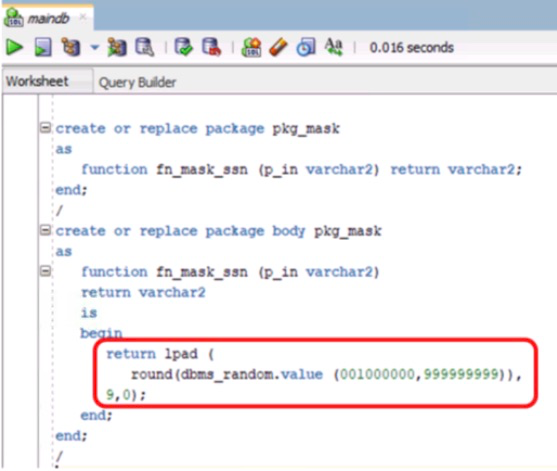
- Converting sensitive data to some meaningless text in the non-production database, is a process known as data masking
- Remap Function: At the time of import process data will change
Following is a Function which is used for Remap Data

Default Database Installation and Configuration Security
- Oracle database contains built-in protections for managing different sections of DB. Some settings are while installing the database. Following some of the settings while installation will help protect the database and database dependent applications
Default Security Setting for New Database Creation
- Default Auditing setting enables investigating suspicious activity
- Creating Strong Passwords, using a combination of upper case, lower case and special characters and numbers in the password, password length should be between 12 and 30 characters
- Remove the CREATE EXTERNAL JOB privilege from the PUBLIC role
- While installation set Security-related Initialization and Profile Parameter
Default Security Setting for Initialization and Profile Parameters

Managing User Accounts Securely for the Site
Securing Oracle Database User Account
- On installation, Oracle provides some predefined accounts. The administrator should secure these accounts by the following methods
– Safeguarding predefined Database User Accounts, setting secure password protection
– Managing Database Accounts such as expired and or database account locks for users
– Password management
- Oracle Database creates a set of predefined accounts at the time of the installation process. The following are some categories
– Administrative accounts
– Non-administrative accounts
– Sample schema user accounts
Securing User Accounts
Lock and Expire the Default Created Accounts
- Make sure to lock and expire all pre-defined user accounts created while installation. The database configuration assistant by default locks and expires the created accounts
- Use DBA_*, DBA_ROLES, DBA_SYS_PRIVS, DBA_ROLE_PRIVS, DBA_TAB_PRIVS, DBA_AUDIT_TRAIL (if standard auditing is enabled), DBA_FGA_AUDIT_TRAIL (if fine-grained auditing is enabled) data dictionary views to get user database access details enabled
– Revoke SYS.USER_HISTORY$ table access from all users except SYS and DBA accounts
– Revoke RESOURCE and CONNECT roles from typical application accounts
– Restrict proxy account privileges to CREATE SESSION only
– Maintain roles specific to each database installation
– Ensure that the default user passwords are modified
– Build a complex, long password which is easy to remember
– Make sure to enforce password policy
– Encrypt the column storing the user passwrods
– Revoke Execute from PUBLIC for UTL_SMTP, UTL_TCP, UTL_HTTP, UTL_FILE, DBMS_OBFUSCATION_TOOLKIT packages
Example : Revoke on utl_file
SQL> REVOKE execute ON utl_file FROM PUBLIC;
Securing User Accounts (Cont’d)
- Implement least privilege principle: Grant minimum required privileges needed to execute the jobs
– Restrict SYSTEM and OBJECT privileges granted to database users
– Restrict users having SYS-privileged connections to the database
– Restrict users having privileges, like DROP ANY TABLE
– Restrict users having privileges to create, modify, or drop database objects
Example: SQL Query to get all users with the DBA role
SELECT grantee FROM dba_role_privs WHERE granted_role = ‘ DBA ‘; - Restrict giving CREATE ANY EDITION and DROP ANY EDITION privileges: CREATE ANY EDITION and DROP ANY EDITION privileges should only be assigned to users who perform upgrades
- Restrict security related privileges: Privileges like CREATE ANY JOB, BECOME USER, EXP_FULL_DATABASE, and IMP_FULL_DATABASE should be restricted to a few users
- Restrict non-administrative users from accessing SYS schema owners objects: To protect data integrity only administrative users should be allowed to allowed to alter table rows or schema objects present in SYS schema, because doing so can compromise data integrity
Securing User Accounts (Cont’d)
- Restrict giving EXECUTE privileges on the DBMS_RANDOM PL/SQL package
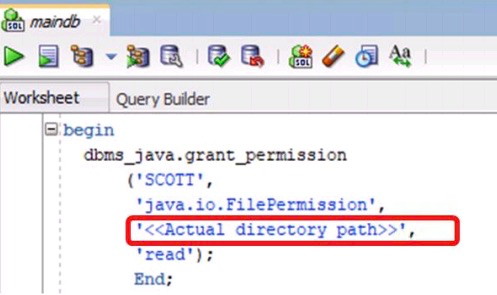
- Give limited users permissions on run-time facilities
Vulnerable Runtime Call

Secure Runtime Call-Specifying a Directory Path
Password Management
Password Locking
- FAILED_LOGIN_ATTEMPTS (Parameter)
– Number of failed login attempts before a user account is locked - PASSWORD_LOCK_TIME
– Duration in days for locking the account once the failed login attempts exceed
Password Expiation And Aging
- PASSWORD_LIFE_TIME
– No. of days a password is a valid before expiring - PASSWORD_GRACE_TIME
– No of days after first successful login after the password has expired
Password History
- PASSWORD_REUSE_TIME
– Duration in days for password reuse - PASSWROD_REUSE_MAX
– Number of password changes before re-using the current password
Password Verification
- PASSWORD _VERIFY_FUNCTION
– PL/SQL function for checking the complexity of password before assigning the password (Should be owned by SYS User)
Lock all Expired Accounts
- DBCA by default expires and locks all accounts other than the following Accounts
– SYS
– SYSTEM
– SYSMAN
– DBSNMP - Ensure that you lock and expire all Manually created accounts which are not in use

Assign User s to Password Profile
- Assign a password profile to a user by editing the user

Disable Remote Operating System Authentication
- Since while implementing Remote Authentication the database user is authentication externally on remote system, make sure to disable remote authentication unless you trust all clients using remote authentication
- To disable remote Operating System Authentication, ensure that the REMOTE_OS_AUTHENT instance initialization parameter is FALSE
- Remote Operation System Authentication is disabled by default REMOTE_OS_AUTHENT = FALSE
Securing Data
- Enable Data Dictionary Protection
– To prevent users having ANY TABLE system privileges from modifying the content present in the data dictionary, enable data dictionary protection
– Enabling data dictionary protection enables SYS users to login as SYSDBA only and no other user
– Data dictionary protection is enabled by default
– To enable data dictionary protection ensure that O7_DICTIONARY_ACCESSIBILITY is FALSE
– Set O7_DICTIONARY_ACCESSIBILITY = FALSE in initsid.ora control file or set O7_DICTIONARY_ACCESSIBILITY = FALSE in a server parameter file - Limit operating system access
– Make sure to restrict user access to data files, log files, trace files, external tables, BFILE data types - Encrypt sensitive data along with backup media containing database files
Restrict Access to Operating System Directories
- Configure the UTL_FILE_DIR parameter to :
– List the directories available for PL/SQL file I/O
– List database server directories to which the user has read and write permissions

Securing Database Installation and Configuration
- To prevent users from overwriting installation files, installation should be done offline. If installation is done on the network make sure to disconnect logged in users before installation
- To reduce the attack surface, install only required components and remove components which will not be used in the production server
- Use the latest version and patches. Outdated and unpatched software increases security risks. Browse the Oracle website for the latest patches and versions
- Make sure to set the “unmask" value to 022 before beginning installation on a UNIX system. Improper “unmask" settings result in unrestricted permissions
- Check the permissions of important folders and files created while installation to prevent unauthorized access
- Example:
– Set the permission to 0750 or less for the files present in $ORACLE_HOME except $ORACLE_HOME/bin
– Set the permission to 0755 or less for the files present in $ORACLE_HOME/bin - To prevent sysdba login to the database ensure that only the Oracle software owner belongs to dba
- Ensure that the “Tkprof" utility is either removed or disabled from production. “Tkprof" utility formats SQL trace output to human readable format. This becomes a source for attackers to identify issues in running the database
Securing Network
- Ensure that the listener is secured
– Set the listener password
– Turn on logging
– Set ADMIN_RESTRICTIONS in listener.ora to disable all runtime modifications
– Set a different listener name than LISTENER
– Set directories for tracing
– Use IP addresses rather than hostnames
– Ensure that the listener password is not stored in listener.ora file - Create separate listeners for clients and for administration
- Ensure the use of a firewall to protect Oracle (Windows)
- Accept connections from short list of IP addresses
- View the sqlnet.log files on the server and client machines
- Check with the port scanner for open default ports
- Secure the intelligent agent
- Ensure that the connection is configured to implement encryption between clients and the database
 Cheng®