
- Deployment is the last phase of software development lifecycle where the application is moved form development environment to production environment
- It is the first time where the system administrator is involved in software development
- The application can be exposed to different types of attacks, if an administrator commits configuration mistakes in the deployment phase
- Security should also be the key consideration while deploying any application
Prior Deployment Activity: Check the Integrity of Application Package before Deployment
- Software vendors generally provide checksum of the application with the application package
- System administrators should again generate a checksum of the application and compare it with the checksum provided with the package to ensure the integrity of the application
- Two identical checksums confirm that the application is not tampered during the delivery
Prior Deployment Activity: Review the Deployment Guide Provided by the Software Vendor
- Use deployment checklists provided by the software vendor
- Do not build and use your own deployment checklist as it may affect the application security
Deployment Activities: Ensuring Security at Various Levels
- Secure deployment involves ensuring security at various levels from bottom to top
- It involves considering security related to the potential customer environments which include:
– Host Level Deployment Security
– Container Level (Tomcat) Deployment Security
– Oracle Level Deployment Security
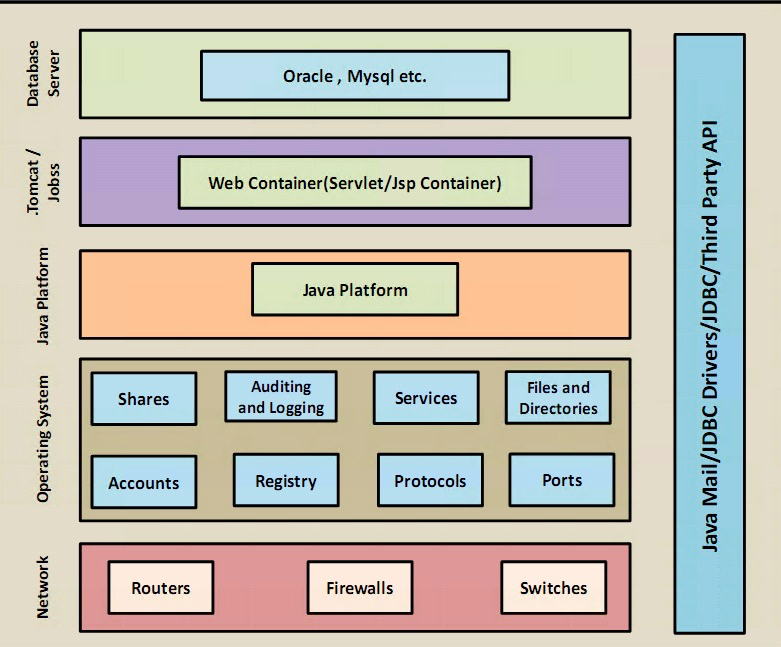
Check and Configure the Security of Machine Hosting Web Server, Application Server, Database Server and Network Devices
- Firstly, the production environment will be secured, if the machine hosting the web server is secured
- The physical security of a host machine, its OS security, and the security of the all other software installed on the machine should be ensured
- Check the host server and all of the services upon which the application security will depend
Physical Security
- Ensure that server machine is placed in a secured area
- Ensure that an appropriate physical access control is implemented to restrict unauthorized physical access
Host Level Security
- Patches and Updates (Component)
– Not deploying patches and updates to the web sever can allow attackers to run malicious code or intrude the server - Services
– Services are easy targets for attackers to access the privilege and exploit the functioning of the server
– Do not run the service that is not required for the server functioning
– It is important to monitor running services - Protocols
– Do not implement protocols that are insecure and can not provide encrypted authentication
– Example: Telnet, File Transfer Protocol(FTP), Simple Mail transfer Protocol(SMTP) - Accounts
– Audit the user accounts regularly to avoid any malicious activities
– Provide limited privileges to account to prevent privilege elevation
– Delete accounts that are no more beneficial for the application
– Implement strong password policies - Files and Directories
– Implement NTFS permissions on files and directories on web server this will allow access to only Windows services - Shares
– Secure file shares process with NTFS permissions
– Limited shares reduces intrusion possibility on web server - Ports
– Services running on server listen to specific ports
– Auditing ports regularly will help to detect any irregular service on the server - Registry
– Secure the registry by:
– Applying restricted Windows ACL
– Blocking remote registry administration
 Cheng®