
- Throwing exceptions while logging a process can sometimes disrupt the process, and failure to throw exceptions can create security vulnerabilities
- Programmers should ensure that the logging process should not be disrupted by throwing incorrect exceptions
Vulnerable Code
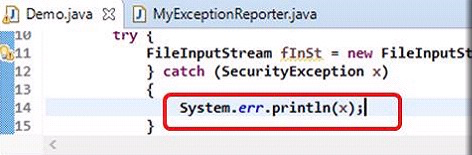
- The code snippet below writes SecurityException to the standard error stream that can be inadequate for the logging process
- Standard error stream can be exhausted or closed and may further prevent exceptions from recording
- Error streams used for certain security-related exceptions or errors may not provide adequate security
- If any input/output errors occur while writing security exceptions, the catch block may throw an IOException leaking security information to the attacker
- Using System.out.print*(), Console.printf() or Throwable.printStackTrace() to print may leak security information
Secure Code
- The code snippet below uses java.util.logging.Logger (default logging API in JDK 1.4)
- It attempts to simplify the entire logging process by using only one logger


Erroneous Exceptional Behaviors: Restoring Objects to Prior State, if a Method Fails
Objects (general and security-related) should be maintained in a consistent manner even if exceptions arise
Objects consistent methods include:
- Using rollback during failure events
- Rearrange exceptional condition mechanism so that the exception condition executes before the modification of the object
- Any changes to the object should be avoided
- Input validation
- Operations that require execution should be implemented on a temporary copy of the object rather than the original object and committing those changes to the original object
Erroneous Exceptional Behaviors: Restoring Objects to Prior State, if a Method Fails (Cont’d)
Vulnerable Code
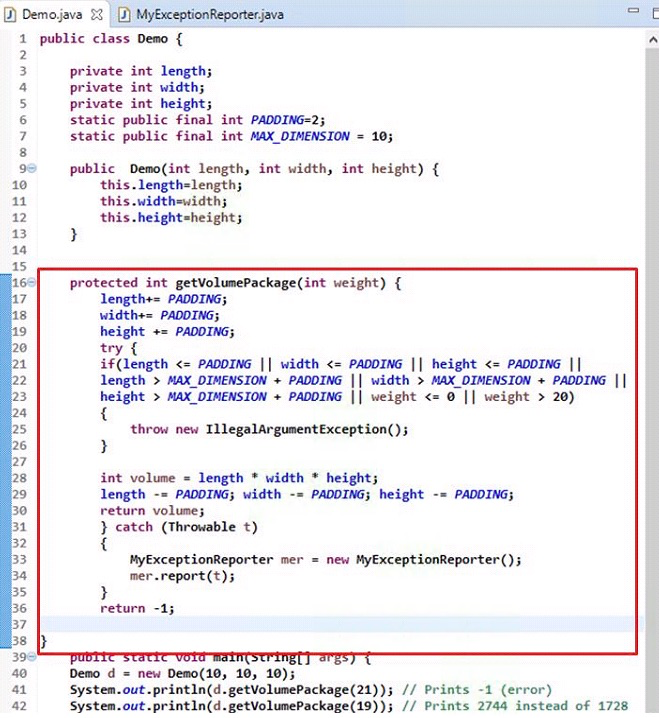
- The code example uses dimension class with three internal attributes length, width and height of a rectangular box
- The getVolumePackage() method is used for returning the total volume of the box after accounting for packaging material
- getVolumePackage() method returns volume
- Input validation rejects negative values
- Input values cannot be more than 10, if an input is more than 20 then illegalArgumentException is thrown
Secure Code
Example with Input Validation
- The secure code performs input validation before modifying the object state
- The try block in the code considers only those statements that throw exceptions removing others outside the try block

Secure Code
Example with Rollback
- The code example uses a catch block replacing the getVolumePackage() method
- This code aims at restoring prior object state if any exceptional event occurs


Erroneous Exceptional Behaviors: Avoid using Statements that Suppress Exceptions
- Use of return, break, continue or throw statements is restricted in a finally block
- When a program executes a try or catch block , the finally block in the try block is executed, sending the program to normal completion
- Statements used in the finally block may cause the try block to complete abruptly and suppress any exceptions thrown from the try or catch blocks
Vulnerable Code
- In the code, return statement used in the finally block completes abruptly

Secure Code
- In the below code, return statement is removed from the finally block

Erroneous Exceptional Behaviors: Prevent Access to Untrusted Code that Terminates JVM (Cont’d)
- System.exit() when invoked can even terminate the Java Virtual Machine (JVM) resulting in the termination of currently running programs as well as threads that might even lead to Denial-of-Service (DoS) attacks
Vulnerable Code
- The below code shows how the JVM is shutdown and the running process is terminated by using System.exit()
- The code also does not have security manager to check if the caller is valid or not to invoke the System.exit()
Public class Demo {
    public static void main(String args[]) {
        System.exit(1); //Exit Abruptly
        System.out.println("This will never Execute");
    }
}
Secure Code
- The code contains security manager “passwordSecurityManager" that overrides the checkExit() method of the SecurityManager class
- This installed security manager tracks if exit is permitted or not
- It also does necessary cleanup action as well as logging the exception

 Cheng®